
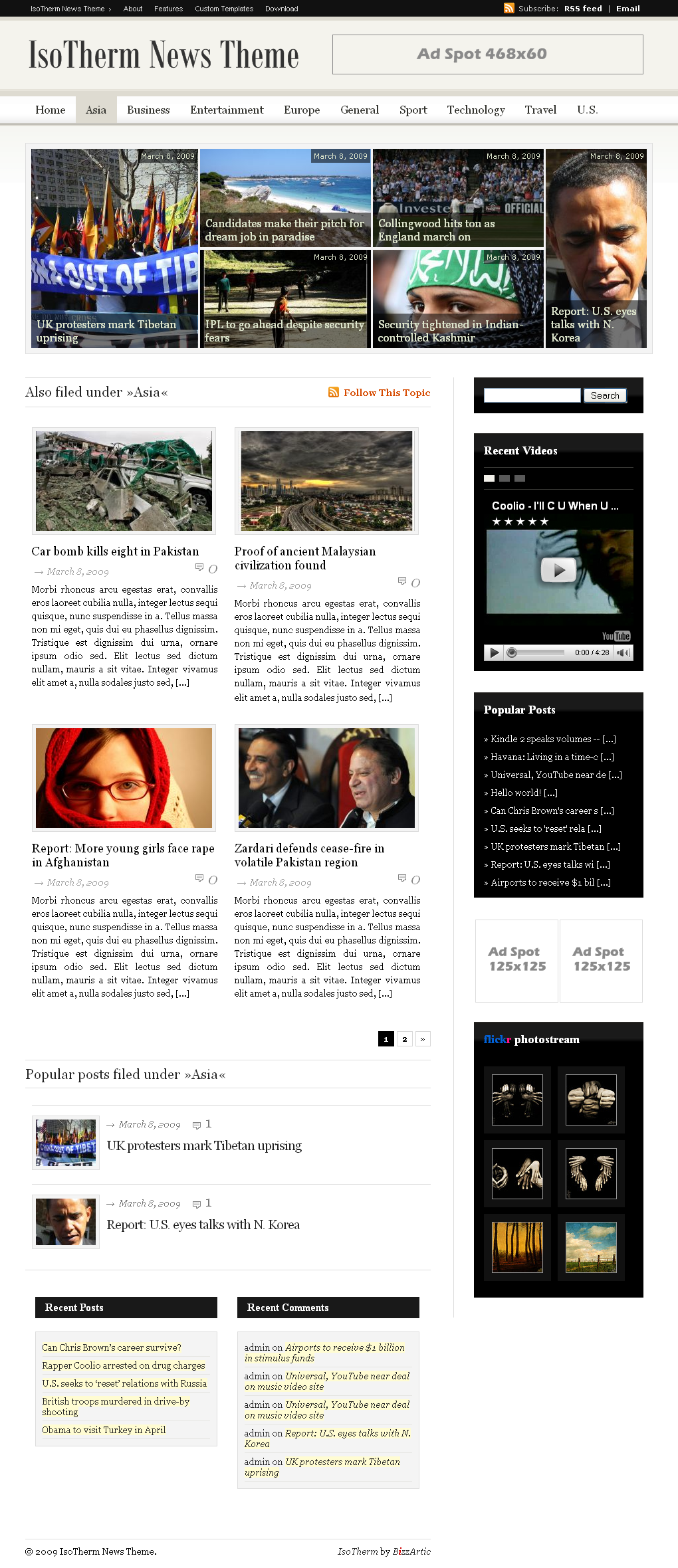
After month of work my next theme called IsoTherm News is out and ready for professional use. It is magazine styled theme with everything you need to start publishing your own web journal with all the features you will need to attract new visitors.
Here are some unique features:
- Featured posts box (front page + archives)
- Video Widget
- Popular Posts Widget
- Footer Widget Spot
- RSS feeds for all blog areas
- Popular Posts for Browsing Category
- See the remaining list of features here
Front Page:
Single Page:
Archive Page:
Please subscribe to stay informed about my next web project.


Jeff Grace
10 months ago
Hi, This is a really beautiful theme! I’m having trouble with the thumb.php. In the Main Index template, is this the code that call timThumb and creates the thumbnails for the front page?:
//<a title=”Link to ” href=”"><img src=”/thumb.php?src=ID, “image”, $single = true); ?>&h=&w=&zc=1&q=80″ alt=”" class=”fll” style=”margin-top:5px;” /> //
I put this code in comment slashes in case it need it for this post! Is there a problem here in the code? It’s not creating thumbnails for the front page. I have the same problem in Intuit type…
Željan Topić
10 months ago
@Jeff – you’re probably not inserting image url code correctly,…go through theme support guide bundled in theme options (at top).
If you don’t find answers to your issues give me admin access and I’ll fix it (of course send login details to mail not here =).
Jeff Grace
10 months ago
Zeljan,
I did read the support guide, but I’ll be damned if I can fine where the “Custom Field” is. I’m not seeing it when I upload the image nor when I edit it. I see the link URL and can copy it, but I see no Custom field…
Željan Topić
10 months ago
@Jeff – It looks sth like this http://justintadlock.com/wp-content/uploads/2007/10/custom-fields.gif
…still not findig what you’re looking for? read my previous comment and hit me with a mail
Jeff Grace
10 months ago
Zeljan,
I know what it looks like from your tutorial… I don’t know where it is found because I am NOT finding it in the dialogue I see when I am uploading. inserting/editing a picture in a post. Am I supposed to be seeing it at that point… or is the custom field accessed elsewhere?
I need to know how to do this so I don;t want you to have to login and do it… thanks, though!
Željan Topić
10 months ago
@Jeff – than you probably don’t have Custom Fields option checked in post Screen Options … still it’s hard to tell as I don’t know what’s the actual problem just from your description.
Jeff Grace
10 months ago
Zeljan,
Can you do a screen capture of the entire widow where you are seeing the screen options? That might tell me where I should see it…
Jeff Grace
10 months ago
Well, you have my email… I’m taking these offline until I get it fixed…
Jeff Grace
10 months ago
Zeljan,
I finally figured it out! It includes several steps … just as I feared so it’s a good thing I worked through it and now understand it. I’m a do it yourself kind of guy… nothing personal. Thanks for a great template! Looks really nice! I hope it brings you success!
monk
10 months ago
Hi Željan. A fine template, excellent work! As always, I have translated this template on Russian and have laid out at myself on a blog for free downloading.
To look it is possible here:http://www.wpcredo.ru/?p=908
Русифицированную версию шаблона можно скачать у меня на блоге.
paulmeister
10 months ago
This is one hell of a theme! I really like it!! Next magazine styled blog that I’ll build- will use this theme.
Cheers.
Paulmeister
Jeff Grace
10 months ago
Hi Zeljan,
Just for your information… the categories stopped appearing in the top menu. Instead, I see “Home” and “No Categories”. I changed to using your very nice Igloo News, though… so this is just for your info!
Jeff
Željan Topić
10 months ago
@Jeff – That’s not likely the error because of IsoTherm News theme, it probably has sth to do with your MySQl DB (If you’re testing it on your localhost restart MySQL instances).
Angelo
10 months ago
Hi,
I’m also having the same problem as Jeff above with the category shifting back to the main page after 7 posts to the category are up. You can no longer see the other six posts. If you remove one post from the category everything is back to normal.
Angelo
Željan Topić
10 months ago
When you have 6 posts or less posts are listed as a list, after 7 posts or more, last 6 of them are shown in featured box, 7+ are shown in a list.
It sounds complicated but if your blog shows otherwise please give a link to category where problem occurs.
Angelo
9 months ago
Duhhh… thanks it’s fine.
I do have another issue with a plugin I use on other wordpress themes that works fine. But it doesn’t work well on this theme on different browsers. Good on IE, but not so good on Firefox, Google Chrome and Safari.
The plugin is an Event Calendar at http://wordpress.org/extend/plugins/events-calendar/
Wonderful event calendar and I need it for this blog or magazine. Can you my page http://wordpress.org/extend/plugins/events-calendar/ on different browsers please and comment.
Angelo
9 months ago
Sorry, I meant to add my website page here for you to see but I pasted something else.
Here is the page with plugin that isn’t working on this theme.
http://theheretic.ca/event-calendar
Ankur
10 months ago
Yes Zeljan – same issues – the thumbs on the homepage are not being update via the custom field section.
can you drop me a email? thanks!
Željan Topić
10 months ago
@Ankur – please go through support tutorial bundled in theme files,…if that doesn’t go well hit me with a mail.
CMS Themes
10 months ago
Great work on the theme mate, I just listed the theme on http://www.cmstheme.net/theme/wordpress/isotherm.html
Tan The Man
10 months ago
Kudos…
Jeff Grace
10 months ago
Zeljan,
It’s on my server account … and my ISP (GoDaddy) handles all the installations so I think I’m out of luck! I’m also not very knowledgeable on using MySQL… I’ll have to look and see if I can do that myself without asking them to. Thanks for the reply!
Željan Topić
10 months ago
@Jeff – I’m quite like you, I rather do sth myself, rather than wait for others to help – but it’s not always the easiest path
Rob
10 months ago
Love the theme! I cannot get ‘categories’ to show up on the site. Any ideas? They’re established, not excluded, and linked to the stories. Thanks for the reply!
Željan Topić
10 months ago
@Rob – I ques you have the same problem as @Jeff : it probably has sth to do with your MySQl DB (If you’re testing it on your localhost restart MySQL instances).
If that is not the case I would really appreciate if you give me admin access so that I can digg myself into it and maybe discover a bug if there is one.
Rob
10 months ago
The pictures are working fine. Two items there you might add to the instructions: 1. images must be .jpg, not .png and 2. the link must be local (i.e. /images/file.jpg) With those two variables fixed, it works great.
The CATEGORIES section is the remaining issue. If you think access to the site would help, pls advise how I can send it to you w/o publishing it for the world to see.
Thanks in advance for your help.
-Rob
Željan Topić
10 months ago
@Rob – create me admin account and send details via email: admin@bizzartic.com
Beto
10 months ago
Great theme love the design. I just have one issue. I already have posts with pictures but whe i select the same picture to be in the custom field, it appears twice once in the top and once in the original position. Can you please tell me what em i doing wrong.
Thanks,
Željan Topić
10 months ago
@Beto – I suggest you to disable thumbnail images in single.php file, delete code between lines 55 and 65 and custom filed images will not appear on single page.
Rob
10 months ago
eMailed you the un/pw. Thanks for the help! -R
ElectricBill
10 months ago
There is no explanation on how to get the thumbnails to work on the main page… extremely frustrating.. With the thumbnails being one of the most enticing things about this theme I would suggest making ALL documentation on how to get the thumbnails working be readily available.
I have read all info and I cannot find one thing regarding HOW TO get the thumbs to actually work… no step by step instructions…
I read the support guide:::
_______________________
**** Featured Post Box ****
> Featured posts box is there by default and it takes a lot of discipline from aouthor to
upload image for every post they publish. If you consider yourself so disciplined to
paste an image for every post you’ll publish than leave it,…however you may hide
featured box if you want
> If you decide to hide featured post box your posts will be displayed normally in one or
two columns (as defined below).
__________________________
Nothing there to tell me anything….
Like I said since the thumbnail image for the post is one of the most enticing things about this them then it would help to have the instructions laid out step by step… I do not see this anywhere… UNLESS…. I missed it… if so point me to the instructions on how to get the images to show up……
THANKS… GREAT THEME…
ElectricBill
10 months ago
OK.. here ya go… I didn’t find this anywhere I just LUCKED INTO IT…..
I created a custom field in the EDIT POST section…
I named that field — image —–
in the IMAGE VALUE section I put the URL to the photo….
SAVED the post and VIOLA…. image is in the thumbnail section on the main page…
Željan Topić
10 months ago
Yeah, you did exactly what theme support guide says so
– it’s on the top of manual (Auto Image Resizing).
Maybe it is a bit confusing because you jumped to to Featured Post Box, my mistake
Acouphene
10 months ago
I just can’t succeed with thumbnails…
Could someone explain to me exactly how I’ve got to proceed ?
Mu (temporary) url is :
http://60gp.ovh.net/~oreillemh/
Best regards and congratulations for this great theme !
Željan Topić
10 months ago
Go through support tutorial – if anything from there doesn’t help, send me a mail with login details, so that I can check by myself.
ElectricBill
10 months ago
What line of the Support Guide file gives instructions on how to do that…???
I looked at it again and didn’t see anything regarding the thumbnails accept what I posted above…
ElectricBill
10 months ago
Yep that is exactly what I did… since that is the FEATURED POST IMAGE… I thought it would be in the FEATURED POST BOX instructions…
If I may make a suggestion on the Support Guide… You may want to combine those two entries… because it is very confusing to have two different entries for one feature.
GREAT THEME…. and it is looking a lot better with the images showing up….
THANK YOU….!!!!!
Željan Topić
10 months ago
I will try to make it more intuitive, tnx for the feedback
SongCafe
10 months ago
Bizz artic, you my lovely theme … I use you into several website. Really realy I love you. Keep spirittttt, and ALWAYS FREE
Željan Topić
10 months ago
All of my current themes will always be free with all the new updates they will get but I can’t say what future brings – I’ll have to monetize my work one way or the other.
eva
10 months ago
How can I change header color background? thanks!
Željan Topić
10 months ago
Of course, if you’re familiar with Wordpress you’ll have no troubles, but in other case open theme files and play around a bit.
Top header background is x-repeated image you can find in skins->bgr-default.png. Open it and change colors to suit your needs
eva
10 months ago
IT WORKS! THANKS A LOOOOOT!
Jeff Grace
10 months ago
Hi Zeljan,
I got it to work with your help… thanks! I am seeing something odd when I view it with IE 7 and IE 8, though, so thought I’d let you know. The articles on the front page are not displayed correctly… I have the options set to display two articles but they are displaying as single column and the text is too large. It looks fine in Firefox and Safari though. I’m using your other theme, IglooNews… I’m kinda torn on which I like best!
Sean Ashdown
10 months ago
Hi Jeff,
I am experiencing the exact same issue – if you find a solution I’d be grateful to hear from you.
Sean
jon
10 months ago
I think this is one of the most well-thought-out, professional, best-executed wp themes around. Way to go, man. Wow.
Sean Ashdown
10 months ago
Hi Zeljan,
Same problem as Jeff, when I view my site through IE7 and IE8 the text in the ‘Also in the News’ section and the Calendar is at point 14 maybe 18 and is single column. I’ve looked at the demo site in these browsers and it looks OK. My site is grapevine.org if you need to see it.
Željan Topić
10 months ago
Sean, can you put back old IsoTherm theme on your blog so that I can see where’s the problem?
Sean Ashdown
10 months ago
Hi Željan,
I have put back IsoTherm theme for you to check. Kind Regards.
Susan
10 months ago
Video on the sidebar is not working. I have deactivated all the plugins and seen whether any plugin is conflicting with it, but in vain. Can you tell me what’s going wrong.
Željan Topić
10 months ago
If you followed support tutorial it should work correctly.
Susan
10 months ago
Dear Željan,
I have done as per support file. I have posted a youtube video using the custom field “video” but they are not appearing. Instead, it is just showing the URL. You can see the site name in email address. Take a look and see what is going wrong.
Željan Topić
10 months ago
Susan, you need to paste EMBED code and not URL one.
Susan
10 months ago
Thanks a lot Topić,
Great help.
Regards,
Susan
Angelo
10 months ago
I’m having problems with getting an avitar or gravitar to work on the post author. It’s always blank.
The avitar shows up in the admin profile pages but not on the site.
Thanks,
Angelo
Željan Topić
10 months ago
Try updating avatar for your email addres at gravatar and see if it helps.
Angelo
10 months ago
No it didn’t help. Any other suggestions?
Željan Topić
10 months ago
only lowercase chars allowed, so add your mail with lowercase chars to your profile options in your blog, angelo and not Angelo
Angelo
10 months ago
Thank you Željan Topić, that did the trick!
Federico
10 months ago
HI, did you found the categories, problem?
Can anyone tell me what’s the problem? It’s a WP problem?
Željan Topić
10 months ago
Most usually the problem is if you exclude default ‘Uncategorized’ category, WP doesn’t allow that so it erases all remaining categories – so don’t exclude default category, maybe raname it to ‘General’ or sth
Anthony
10 months ago
Wow. This theme is outstanding. The options page is the most impressive I’ve seen. No where to make a donation to you?
In the future I’d be interested in creating another widgetized footer below footer 1 and 2. I would like it to be the width and height of footer 1 and 2 combined. I know there is technically a footer below 1 and 2 (with a link and copyright) but I’d rather not play around with that being that I’m new to Wordpress. I realize that’s a bit of work and I’d be willing to pay or donate for the support / code.
Anyway, just wondering if that’s possible. Look forward to hearing from you. Again let me know if there is a way to support this theme or Bizzartic. I’ve been scouring the web for weeks and this is the best wordpress magazine theme (in my opinion). Many thanks.
Željan Topić
10 months ago
Tnx for kind regards,…I don’t like donations but if you feel a need to support my work your comment did the work, of course I wouldn’t bother if you spread the word around a bit
Regarding my commercial ativities with WP themes – I only sell themes to clients to sell them further and that’s it – I’m not much of a sales person so I rather leave it to professionals.
Please contact me on my mail regarding your customization.
Sean Ashdown
9 months ago
Just like to add my thanks to Zeljan not only for a great theme but also some pretty splendid support.
I have, however, noticed a couple of issues that only seem present in IE 8 and Firefox 3.0.8 for PC. Versions 6 and 7 of IE seem OK as does MAC version of Firefox and Safari.
The following items do not display in the above browsers:-
Banner Ad 250×250 – Iso → Ad 250×250 wiget
Banner Ad 468×60
Tradedoubler Script Below Header and Above Comments
Google Adsense via Easy AdSenser Plugin
Željan Topić
9 months ago
I will digg myself into it, tnx for the report.
Paolo
9 months ago
Very nice and complete theme. I’ve inserted it in WordpressGala, my WP themes gallery site.
kk
9 months ago
Hi, great theme bizzartic, best theme I have seen online to be honest. I need your help with something please. I noticed no one asked this so I may be the only one with this error.
I get an error when viewing posts. The comment option is not being displayed, these are the errors I get, please assist me.
Error (1): Fatal error: Call to undefined function cancel_comment_reply_link() in /home1/junkaloo/public_html/hilltopbuzz/wp-content/themes/isotherm/comments.php on line 122
Error (2): Fatal error: Call to undefined function previous_comments_link() in /home1/junkaloo/public_html/hilltopbuzz/wp-content/themes/isotherm/comments.php on line 49
Please if anybody is familiar with this problem do not hesitate to comment. Thank you.
Željan Topić
9 months ago
Never experienced that error before, give a link to it.
kk
9 months ago
Thanks for the quick response, here is the link:
http://hilltopbuzz.com/?p=1
Željan Topić
9 months ago
Did you change the code in any of supplied theme files?
kk
9 months ago
No, I did not touch anything whatsoever. Maybe I should re-upload a fresh comments file. Is that what you make of it? Why am I the only person having this issue???
kk
9 months ago
Never mind, the problem is that I was using an older version of wordpress. I had to convert fantastico to simplescripts and now I’m all set.
Wildcat
9 months ago
Hi Zeljan!
I am using your theme and it’s really good. One of the best in whole net. I loved it, but I have some questions because I don’t know how to do what i want to do
I hope that you will help me.
1. How to link category to external link? ( I would like to make category “Forum” and link it to my forum page.
2. Is possible to link category with single page only? I would like to have one category without post, with one page only or single, whole page post.
3. How to change post date details? I have translated this theme to polish but everytime when I make a post shows date in english ex: April 25, 2009
Many thanks
Wildcat
Željan Topić
9 months ago
There is no easy way of doing this,…you’ll have to digg yourself into code and play with it,..just a hint – add static link in categry menu you’ll find in header.php file,…date details can be changed in single.php file (browse php date formats to find which suits you best).
kk
9 months ago
I need help for this please. I have tried hard for days to figure this out to no avail. When I am viewing a single post, the right side bar does not display in the right position, instead it is displayed below the post so user has to scroll all the way down to see that there is a right side bar. Please take a look at this page: http://hilltopbuzz.com/?p=59
Please help anybody. What modifications can I make to make the side bar display in the proper position? I am using chrome and IE 8 and they both have the same problem. I modified the width of the comments box to see if that was the issue but that did not work so I reset the page as it was. Please help!!!
kk
9 months ago
Can someone please assist me, I need help with my previous problem. Thanks
Željan Topić
9 months ago
It somehow happened that you or one of your plugins added aditional /div element so page class closes after comments and sidebar doesn’t slip in. Give me admin access and I’ll fix it or play with it yourself.
kk
9 months ago
Thanks, I sent you the email. Please check thank you again!!
Dexter
9 months ago
Hi, great theme! I have a question though, how would it be possible to show more than 4 posts after the 6 featured posts?
Thanks!
Željan Topić
9 months ago
Of course just increase the number of posts displayed in wp reading option. By defaut it is 10.
Dexter
9 months ago
haha sorry, new to wordpress! Anyhow, 1 more thing, you know when you click on a image and it brings you to the article’s page, the picture takes the whole section and you can only write text below picture, and not around it. I find this to be kinda lame
I don’t think this can be changed in WP options though, so I’ll have fun with php.
(If you didn’t understand what I meant: http://bizzartic.com/bizzthemes/isotherm/2009/03/08/can-chris-browns-career-survive/, the picture is big and you can only add text below it)
Orlando Rondanelli
9 months ago
Anybody can i help me?. how can i associate a image to a entry?, because i write a new entry, but i don’t configure a image that going to show in principal page. my english isn’t good, i speak native spanish. i need ur help
Željan Topić
9 months ago
I don’t fully understand so write in spanish, just use plain language.
Wordpress Plugin
9 months ago
Great News Theme,
I Love this
Gustavo
9 months ago
Great theme!
Is there a way to make featured part show only posts of certain categories?
Željan Topić
9 months ago
It is but customization is needed to hack the code,…please wait until I release my custom service offering or try to do it yourself, no offense though!
Marissa
9 months ago
This theme is fabulous! Kudos!
For some reason, I’m unable to modify the “visibility” or “published on” characteristics after I publish a post. Is there a quick remedy to this?
Thanks!
Željan Topić
9 months ago
I haven’t found a solution yet but am working on it…til then use defult post date and not relative one.
kk
9 months ago
Hey arctic, kK again. I noticed today when I made a post it showed the date as posted 3 weeks and 6 days ago, which makes no sense. Can you help me please. Thank you.
Željan Topić
9 months ago
Sometimes I encounter the same problem,…but haven’t found a solution yet. I think it has sth to do with timezone settings or regional hosting server set up.
If anyone finds a solution please post it here, at least me and kk would appreciate it
Maria
9 months ago
Hello, I think I found a bug in the theme. It seems that if you upload a high resolution picture, something like 3560*2374, it won’t show up in the featured posts and will actually mess it up. The first big featured box gets divided into two o.0 weird stuff.
Željan Topić
9 months ago
Maria, tnx for the report,…open
thumb.phpfile in theme directory and replace the whole code with this – I hope it helps.Maria
9 months ago
Hi, thanks for the reply. Unfortunately, it didn’t completely fix the bug. Although the image now shows up the post, it stills messes up the featured box. =(
Željan Topić
9 months ago
You can ad adsense,…open
header.phpfile and replace banner script with adsense code.Maria
9 months ago
Me again, sorry forgot to add something to my other post. Is there anyway to be able to add a AdSense ad close the logo and into the sidebar? Because it appears they are not adsense ready like the two other.
RS
9 months ago
Hello
For some reason, articles aren’t being displayed beneath the featured box (in the ‘Also in the news’ section). Could you possibly help out?
Thanks in advance.
Željan Topić
9 months ago
If you have less than 6 posts in certain category or in general posts below featured images will be empty,…if otherwise, send me login details to my mail and I’ll fix it.
christian cortes
9 months ago
Hi! great theme, i love it, i have a problem my featured images doesn’t show, i chanced the permission of the host, and can’t fix the problem, i have install it in local and work perfectly, please helppppppppp!! sorry for my bad english..
Željan Topić
9 months ago
Possible solutions:
- you must upload images to your blog to show up
- you need to paste full path to your image in custom field provided
- you need to chmod your cache folder
- only gif, jpg and png image formats allowed
christian cortes
9 months ago
Thank’s for you response!
i have the images in my blog, i have changed de chmod of the ‘cache’ a lot of times, in this case what are the permission? 775, 765, or … ? also the example images that you have for the faull in the theme doesn’t show up..
thanks a lot…
Željan Topić
9 months ago
Christian, please follow possible solutions I provided in comments before:
- you must upload images to your blog to show up
- you need to paste full path to your image in custom field provided
- you need to chmod your cache folder
- only gif, jpg and png image formats allowed
christian cortes
9 months ago
all the posible solutions that yo gave me, i did step by step…
thanks anyway!
Dex
9 months ago
Hi
Can you hint me towards the code that I should change in order to be able to add a 728×90 instead of the 468×60 one? I think this would be possible for the one that is below the featured box if I move the sidebar downwards a bit.
Thanks a lot!
Željan Topić
9 months ago
468×60 banner code is located in header.php file, just change it
2010 Election
9 months ago
After I activated the template, the posts on the home page were gone. How can I fix it?
2010 Election
9 months ago
Hi. Have you seen it? I temporarily deactivated it because of my home page. What should I have to edit on the template?
mancai
9 months ago
so great themes tq
Wildcat
8 months ago
Hello
I have translated this theme using theme options but still i have problem with:
“Popular posts filed under”, “Browsing all posts tagged under”, “Edit this entry” etc..
I am trying to find the file where can I change it but I can’t find it. Where it is?
)))))))))))
Regards
Wildcat
Željan Topić
8 months ago
I suggest you to translate this sections in theme options panel,..otherwise files are located in archive.php,single.php nad index.php
RS
8 months ago
Hello,
Thank you for such a great theme. Is there a way to have 300×250 ads instead of 250×250?
Thanks
dvr | Ryan
8 months ago
Hello.. This theme realy great. Thanks for isotherm Magazine theme
David Markland
8 months ago
Awesome theme!
Two questions:
1. How does the theme select “featured” posts? Can I personally choose these? It appears to just be taking the most recent entries.
2. I’m having a problem with the second half of the sidebar falling into two columns, one column going out of view… any idea what could be causing this?
Željan Topić
8 months ago
1. As you have found out, featured posts displays recents posts.
2. In few days, I’ll release a large update to this theme so I’d suggest you to wait a bit.
David Markland
8 months ago
Looking forward to it!
I’ll also be looking for a way to be able to choose which posts can go into the featured boxes… even if it requires learning some code!
David Markland
8 months ago
Found a pretty easy workaround:
http://wordpress.org/extend/plugins/wp-sticky/
I can then “sticky” the top 6 posts I want at the top in the featured section. Works awesome!
zanardi
8 months ago
It seems to be working perfectly, great discovery. Thx a lot.
Željan Topić
8 months ago
You don’t actually need plugin to do this, sticky posts are incorporated in WP by default.
David Markland
8 months ago
Thanks, Z! Didn’t see that til you pointed it out. Very cool.
Will323
8 months ago
How do you delete a recent video from the sidebar??? I for some reason have a blank one.
Željan Topić
8 months ago
Sidebar gets videos from post custom fields so if you delete embed video code in post custom field (IsoTherm custom settings) it will disappear.
Sebastian
8 months ago
Hello,
Im having trouble with the Featured Post Box images. They simply dont show up… is there a specific way of linking the images? Thank for your time.
peweck
7 months ago
Nice theme ! but i have a problem with the widget administration, the ajax don’t work, i can’t buld the widget in the sidebar andthe footers
Željan Topić
7 months ago
Do you have the latest version?
Annemiek
7 months ago
Hi!
How can I get a picture in the ‘post box’ ?
‘Cause I can’t get that.
And I want to get at every single post a picture at the left, befor you click on the post to enlarge that.
How can I figure that out?
Thanks!
Annemiek
Željan Topić
7 months ago
First of all don’t exclude default category as others will disappear. Picture gets there by including it in custom fields when adding/editing post. Picture of course needs to be uploaded to your blog to work,…please read more in tutorials provided with theme files
Annemiek
7 months ago
Hi There!
Thanks for the answer, but I still can’t get it. So i’ve got 3 questions:
I want to get a picture at the left side before you clicked on it.
This is the image HTML code:
Which code do i’ve got to put into the HTML code, so the picture will show up, then?
And I also want to get the photo’s into the featured post boxes, so how can I do that?
And how can I get all my new posts at the ‘Home’ page ?
Thanks!
Annemiek
ps. I’m sorry, but i’m a real computer-dummy! So can you please notice every step? Just because i’m a real dummy hahaha, you’re going to be my hero!
Annemiek
7 months ago
I’m sorry, I didn’t place my HTML photo-code into my comment!
Here it is:
Thanks!
hyuhin
7 months ago
Hi,
In the isotherm theme option page it says a logo can be up to 100px in height, but when i tried to add a logo with 100px height something like this happens
screenshot:
http://i40.tinypic.com/aaiv53.png
Željan Topić
7 months ago
Sorry, my mistake, on next update I will note a smaller height. Tnx for the report.
hyuhin
7 months ago
is there a way to edit the style.css so i can use a bigger logo size?
Željan Topić
7 months ago
It is but customization is needed as it exceeds just few lines of code.
Annemiek
7 months ago
Can you please tell me how I can put a picture on the left, before I clicked on the article?
Thanks!
Željan Topić
7 months ago
Can u explain a bit further….?
Annemiek
7 months ago
Well, As you can see at the screenshots,
You’ve got Pictures in the feautured box, and I don’t know how I can get the pictures there, but I’ve do got text in there already!
And I also saw, That when you’re placing an Article, before you’re clicking on it, you can put a picture on the left, how can I do that?
And my articles aren’t showing up on ‘home”, but i do want that! ;D
Željan Topić
7 months ago
Ok, I see you have issues with TimThumb script for auto resizing images. If you followed tutorial (uloaded images to your blog, CHMOD-ed ‘cache’ folder to 777 etc.) and it still doesn’t work, I’d suggest you contact your hosting provider and report them your issue or google for TimThumb script issues a bit more.
Annemiek
7 months ago
Thanks!
Isn’t there a HTML-code I can put into my picture-code?
And where can I find the tuts?
Željan Topić
7 months ago
Tutorials are bundled inside theme files, support.txt is the file you’re looking for.
French_User
7 months ago
Hi, and thanks for your job quality !
But, as @Acouphene, i’ve the same problem with the tumb, and my hosting.
http://90plan.ovh.net/~luxsure/
Sorry but i can’t found in the tutorial, can you help me, please.
Thanks a lot.
Željan Topić
7 months ago
Go and do this to wp-config.php file that you’ll find in WP installation directory:
Override File Permissions
If your web host’s default file permissions are too restrictive, adding these definitions to your WordPress configuration file may help resolve the issue. Note that you don’t need the quotes around the permission values. Here is an example:
define(‘FS_CHMOD_FILE’, 0755);
define(‘FS_CHMOD_DIR’, 0755);
David Markland
7 months ago
Two new questions:
1. Having trouble with the custom CSS – I’ve used this with Thesis and had no problem. But for some reason, in IsoTherm, nothing happens. I’ve clicked the checkbox to activate the custom css file, and uploaded the custom CSS file, but nada. (I’ve been trying to change the background color and images). Is there any special way I need to format the new code?
2. Also need some hints on how to make a background image (perhaps black, or a pattern), but also keep the content area white…. anyone?
Željan Topić
7 months ago
1. Just override original style.css classes.
2. edit x-repeated image: bgr-default.png in images folder.
David Markland
7 months ago
Unfortunately, neither solution works quite as simply. For CSS, I’m trying to override, but using the custom file nothing is happening – directly changing the style file does work, but eliminates the purpose of the custom….
On background image, simply swapping the current background image doesn’t work unless I just want a different image that appears vertically. Switching it from x to y also doesn’t help much, as I still haven’t figured out how to make sure the content area, and only the content area, is white, while the rest of the background is a different color…
Alas, guessing I’ll either have to learn CSS or pay for some of those custom services once I have the financial resources!
Željan Topić
7 months ago
Did you activate custom.css in theme admin? – yeah, it would probably be ok to ask someone to help you with css.
David Markland
7 months ago
Yep – activated the custom file – nothing happened. Again, I’m familiar with this from using Thesis, so no idea why it isn’t working here.
Having some luck figuring out the background code… much tweaking and testing required.
derek martin
7 months ago
the custom css option is not working???
I selected to use it in the settings and then added a simple css test and it’s not working. Firebug doesn’t even show any reference to it?
any thoughts?
Željan Topić
7 months ago
Custom.css is working, just make sure you have the latest theme version and don’t forget to change css styling outside commented /**/ area.
Alexandra
6 months ago
Hi Željan,
I have a problem with the thumbs in my adpation of your theme. There are not thumbs, in the theme there is a box with the information of ALT but not the imagen.
Željan Topić
6 months ago
Please read this post.
David Markland
6 months ago
Another question:
I’m using a few different widgets in the sidebar. Some work seamlessly. A few, however, include the circular bullet point before elements. I can’t figure out what triggers this, or how to keep it from appearing without eliminating it completely (its useful for some built in Bizz widgets). Any tips?
Željan Topić
6 months ago
Huh, tricky (= I’d suggest adding new class to widgets of your choice, example:
Add new class to
<div class="widget newclass">… then go to style.css and add.newclass li { list-style:none }at the end of the file.David Markland
6 months ago
Thanks – puts me in the right direction!
fur
6 months ago
Hi! Very new to this but I think I’ve got your theme up and running. I would just like to know if you have a specific photo gallery plug in planned for this particular theme. If not, is it possible to use a photo gallery plug in within this theme? Maybe you can make a suggestion as to what photo gallery would look well with your theme.
Thanks! Great theme! More power!
Željan Topić
6 months ago
I don’t have any gallery plugins incorporated but if you’re looking for sth more advanced NextGen gallery plugin is the right choice
JJ
6 months ago
My blog is showing 5 of 6 featured posts and I can’t figure out why.
There are also no posts showing up on the homepage.
http://black-cinema.com
Željan Topić
6 months ago
Check how many posts to show did you set up in WP settings/reading, my ques is 5 – change to larger number, 10 is default.
JJ
6 months ago
Thanx!
Forgot I had changed the post settings.
Darklittlesecret
6 months ago
Using the theme as a photoblog!
Huge thanks for making this theme, have had great fun adjusting it (not done by far) but I really love the “simpleness” in throwing up posts and images and have it all fitted automagicaly!
(only thing I would wish for is to be able to publish posts directly to the posts underneath the featured top images.. i.e making it so that I can have small notes and miniposts with or without pictures and have these “skip” the big gallery function at the top)
/Tobias
Dan
6 months ago
Thanks for sharing your terrific theme design! On my install, the Featured Post Box does not appear on any archive page. It IS on the home page, but nowhere else. I combed through the options page and don’t see anything that could cause this behavior. What might I have done wrong?
Željan Topić
6 months ago
You need to have more than 7 posts in each category for featured posts panel to appear.
Dan
6 months ago
Awesome response, great answer. Thank you. The more I get into this theme, the more amazed I am by the programming that went into it! Thanks again.
chauncey
5 months ago
I want to change the black headers for the sidebars to a more neutral color and the background of the sidelinks to something else also to make it stand apart from the main content. how do i change colors in the sidebars?
i put this below in the custom css and changed it and it didnt show up. is this a class?
thanks
/*———SIDEBAR ——— */
.sidebar{ width:255px }
.sidebar_right{ float:right; padding-left:30px; border-left:1px dotted #cccccc }
.sidebar_left{ float:left; padding-right:30px; border-right:1px dotted #cccccc }
.sidebar h3{ font-weight:700; font-size:12px }
.sidebar p{ font-size:12px; color:#fff }
.nosidebar .post2, .nosidebar .header-about h2{ width:930px; float:left;margin-bottom:30px }
David Markland
5 months ago
I’m trying to improve the top, featured section so that it actually works just as a featured section, by starting a new “loop” after it…however, whenever I try to put in the following code the whole page just disappear/doesn’t load:
The idea being that I want posts that appear among the 6 featured at the top of the index page to appear, along with their excerpt, below.
Any suggestions on what I need to do to get this to work?
David Markland
5 months ago
(ack – the code was stripped… but basically, it would be the rewind_posts function)
Premium Themes Directory
5 months ago
Great magazine Free theme, It’s premium looks like!
twalter
5 months ago
Great theme, love it! I have one problem though, I know how to change the color of links, but can’t figure how to change the tan highlight links in this theme have. Any suggestions in the code where to look?
Željan Topić
5 months ago
Open
stlye.cssand edit line witha { color: ... }David Markland
4 months ago
Bug?
Unsure what is causing this to happen, but ever since yesterday, the far right featured post is blank… no image or text.
Any idea why this is happening?
Željan Topić
4 months ago
Can you provide a printscreen or a link?
david
4 months ago
Hello,
Great Theme! I’ve learned a lot by reading the support guide and the comments here. However, I can’t figure out how to have multiple images in a post. The first image is easy:
paste url into the custom image location field, and the you publish it, the same url is repeated under custom fields.
however … when I upload a second image … and paste it into a second custom field: nothing happens. I can add the image into the HTML of the post using a normal tag, but it isn’t automatically sized correctly.
any thoughts? apologies if this is really simple and I missed it somewhere> i really have read everything that I’ve seen before posting this
thanks
david
Željan Topić
4 months ago
Only one image is suppost to work as a thumbnail!
david
4 months ago
thanks for the response. maybe i should clarify that I don’t want the image as a thumbnail, just in the single post (same size as the first one in the post).
Here’s and example of a sample post with two images; second image doesn’t auto-resize.
I think i can manually specify an image width (in the img tag) to make it the same size. I was just wondering if there’s a better way of doing this.
thanks again for such great work
david
Željan Topić
4 months ago
Second image must be manually resized to fit the width of content column as it is contained inside post content.
Justin
4 months ago
This theme appears to be really cool. But out of the box, I have a weird error. The 6th image/article in the featured box appears to be missing. When I compare the code to the one on the demo, it seems the if statement is not properly running based on the missing div for the 6th image. I tried reloading the theme from scratch but the error is still there.
Any idea why?
Here is the page
Željan Topić
4 months ago
You need to set up post reading options to 10 instead of 5 (WP admin/Settings/Reading).
Devon
4 months ago
Hey there, great theme.
I couldn’t find an option for adding avatar photos though? Could you direct me in the right direction?
Thanks!
Željan Topić
4 months ago
Avatar photos are handled through your email with this service: http://en.gravatar.com/
Jonathan Poritsky
4 months ago
I would like to change the color of the Category rollover backgrounds as well as the size of the overall header. Is there a way to lessen the gap between the page menu and the catgory menu. Here is the site I’m testing for this new theme:
http://www.poritsky.com/thecandlerblogtemp
Thanks!
Željan Topić
4 months ago
Edit styles in style.css, if you’re not good at CSS I’d suggest you to hook up with a friend that will help you.
Leigh!
4 months ago
Great theme. One minor thing… is there any way to get it to the nextpage functionality working on it? I’d like to make multiple page-posts and I don’t seem to get anywhere with this theme and that functionality.
Željan Topić
4 months ago
Not sure what’s the issue, … featured image panel can’t be used in paged posts as it would break the content stream.
Gabe
3 months ago
Were you ever able to get this working? I’m also now looking for the functionality, but no matter what I try (adding the post page links template tag or using a plugin) it doesn’t seem to work for nextpage or for the more quicktag. I’m trying to use this on single.php, not with the featured box.
Any suggestions?
Thanks.
David Markland
4 months ago
Newest problem: can’t seem to create custom category pages. Does Isotherm not allow this?
Željan Topić
4 months ago
Hmm, not sure where the problem is, if I understand correctly you want custom styling for specific category archive?
David Markland
4 months ago
Yes – according the Wordpress, you do this by creating a copy of the category.php file, which I don’t see in IsoTherm, but renaming it cat-7.php (as an example), and it would simply only list the category 7 archive items, and allow you to make other changes unique only to that page.
Željan Topić
4 months ago
Interesting, … however I use all categories, tags etc. in archive.php file … so I’d rather suggest implementing an if clause, sth like this
if (in_category('events')and apply special code for only that category.Jody
4 months ago
Hi there, this is an amazing theme!!! I absolutely love it and am amazed that its free…
One question: the only thing not working is the posts on the homepage…nothing is showing up? Do you perhaps know what the problem might be? I really appreciate the effort…
Tobar
4 months ago
Is this theme 2.8 ready it get an error when i up load it.
Željan Topić
4 months ago
Demo runs on 2.8.4 so I’d say yes
… try deactivating all plugins and try again.
Albert.Ginger
4 months ago
This is a perfect theme. thank you very much.
giovanni cappellotto
4 months ago
Great theme, thanks a lot.
I’m no able to fix the header heigth. It’ s different if you see the home page, or the single post, or the categories. Firefox, Explorer or Chrome it’s the same.
May you help me, please ?
Thanks in advance for your help.
Željan Topić
3 months ago
Check again and use your plugins wisely next time.
Birchtree
3 months ago
I’m trying to style via your custom override option. I’ve checked it in the General Settings / Customize Your Design section, and I’ve added classes from Isotherm’s style.css into custom.css outside the commented /**/ area. However nothing is happening, and no style changes are visible. Please help.
Željan Topić
3 months ago
Hmm, it should work really, try copying classes from
style.csstocustom.cssand change them accordingly.Birchtree
3 months ago
Thanks for your reply. Yes, copying over from the style sheet and then making alterations is what I have tried. Even the simplest of changes do not work, however (the CSS has been checked over thoroughly as well; no missing brackets etc.). Could it be a write-permissions problem, perhaps?
Birchtree
3 months ago
I’ve checked the directory and the custom.css file is updating correctly, so it’s not a permissions problem. I even deleted everything from the custom.css file and input a simple body {background-color:black;} change, but nothing happened.
This feature doesn’t work.
Birchtree
3 months ago
(By the way, everything else about this theme is wonderful, and I’d really like to use it — I just really want to be able to customize it without hacking the original css and making updating difficult.)
Sonadora
3 months ago
I had the same problem with the custom CSS and realised that the code in Line 28 of the header.php is referencing to ‘custom’ folder for the custom.css file.
Easy fix, just change that part of line 28 from:
<link href="/custom/custom.css” rel=”stylesheet” type=”text/css”>
TO:
<link rel="stylesheet" type="text/css" href="/custom.css” />
Željan – Thanks for the theme! It’s clean and easy to use. I’m using the theme for a travel blog – a work in progress.
Birchtree
3 months ago
Thank you very much, Sonadora!
john wood
3 months ago
Hi, first of all this is a beautiful theme! Thank you very much for making it. I’m trying to add the Google Custom Search on it and it works fine if I put nothing in the “search.php” except the Google code. If I try to keep the look of the theme (header, menu, footer) I get fatal errors (call to undefined function…). Can you help me figure out how to incorporate the search results into the theme and not just an empty page? Thank you!
Željan Topić
3 months ago
Add search form wherever you like, than add action to search results page in your form (example: action=”http://bizzartic.com/search/). After that create page located on “http://bizzartic.com/search/” and enter google cse results code there – that’s it.
john wood
3 months ago
thank you! worked perfectly!
Robert
3 months ago
Hi..
Great Theme. Im using it on my site and it is getting great reviews from everybody.
I have ran into two issues.
1. My fourth video is blank. but the fith video will play. they are all youtubes.
2. when i run any lightview plugin i loose all the videos.
again thank so much for an exelent theme.
Toban
3 months ago
I love this theme, thank you!
Is it possible to pick and choose which posts get featured at the top? I would like to be able to customize that area with only certain posts.
Željan Topić
3 months ago
It is – make desired posts sticky.
john wood
3 months ago
Hi, I have a question about categories. I want to use drop down menus so I created some categories and sub-categories. Now, I want to link some posts to both the main category and the sub-category, but I want the sub-category to show in the top right when the posts are in the top 6 featured posts. Is this possible?
Željan Topić
3 months ago
It is but requires some coding – I’d suggest contacting experienced php developer or WP expert as it’s not a job for savvy.
Adrian
2 months ago
Hello there. Great theme. Is it possible to reduce the number of featured posts in the feature box? I’ve tried editing the code to limited success, as the divs do not align correctly.
I was hoping to have one larger main image (say 500px wide) and two or three smaller ones for the half of the box.
Thank you.
Željan Topić
2 months ago
It is possible but significant time to develop this solution would be required, so unfortunately I cannot assist you on this one
zur
2 months ago
Hi mate, the featured box is messed up on the install Im testing under Theme Test Drive. Here is a screen shot…..
http://skitch.com/notoriousruz/n84yp/chronicling-perths-screen-culture.this-shouldnt-take-long-brains
…thanks in advance for any suggestions.
Željan Topić
2 months ago
On install it’s messed up but when you click save button in options panel for the first time it’s ok as default features get baked in.
rusz
2 months ago
hey thanks for the reply. unfortunately even after saving both the featured post option and the whole options page it still doesn’t work, I’ve had to just disable the box. Any thing else I can try?
Željan Topić
2 months ago
Try uploading larger images – I think that might help as current ones are to small to snap into grid.
ruz
2 months ago
that solved it mate, thanks a lot
Agence Web
2 months ago
Wow, that’s so nice. I really love your themes. It’s really original. thank you for sharing this with us.
pasqualino
2 months ago
Hi this is my site: http://www.wikitesti.com/blog/
Why i don’t see the columb with last topic?
thanka …
André Maricato
2 months ago
Great theme and it works in IE6, it’s a miracle!
Well I can understand some things in php but I’m asking your help to know how can I show after the featured box not only the other posts but those who are in the box.
Željan Topić
2 months ago
hmm, I wouldn’t recommend that but nevertheless: open index.php and change the whole line 91 into this code
if ( $postcount = 0 && !$is_paged ) { continue; } if ( $postcount >= 1 && !$is_paged )xXKronosXx
2 months ago
thank you very much indeed for this pretty theme!
i love it (^.^)
LisaNewton
2 months ago
Hello, I really like your theme, and it works well on my site. I have two issues that are wrapped into one. I really like the blue theme, but was unable to take off the black boxes that houses the widgets. I removed the image for them from the image file, but I must have missed something because they are still there.
So, I put the default theme up because I was able to take off the black widget boxes from this one.
However, I would like to have the blue background back. I’ve tried to look for the link in the editor, but thus far have been unable to find anything regarding the “skins” in the editor.
Can you direct me in the right place?
Thank you so much.
Željan Topić
2 months ago
Blue background? – can you explain a bit more, I can’t recall using ’skins’ for isotherm.
LisaNewton
2 months ago
In my admin panel for the IsoTherm theme, I have the option of choosing the default skin, which I’m currently using or the “blue.css” skin. Plus, in the IsoTherm download, there is a file called “skins” with contains “bgr-blue.png” and “bgr-default.png.”
With the default theme, I was able to delete the small black boxes that housed the title of the widget, however with the blue theme, I was unable to get rid of the larger black boxes that surround the widgets, so I’m using the default theme because I like the white sidebar.
So, two options are left for me. Either I would like to get rid of the black boxes in the blue theme, or get the blue background to show up on the default theme.
Thank you so much for your help.
Željan Topić
2 months ago
OK, I see you’re using old version of IsoTherm – new one comes without option to choose skins so I’d suggest upgrade to new version and editing style.css where needed
SEO Chennai
1 month ago
great theme..
really beautiful theme
mark
1 month ago
1st Off, great theme thanks. For some reason I get the following error message listed below the “Add Comment” box underneath my posts:
Fatal error: Call to undefined function comment_id_fields() in /home4/beverlz5/public_html/thereport/wp-content/themes/isotherm/comments-old.php on line 124
Can you let me know what caused this and how it can be fixed? Thanks.
Željan Topić
1 month ago
Install latest version of WP and the error will disappear.
phoenixstorm
1 month ago
Your themes are great! I wanted to ask a quick question before I install the isotherm theme. Is it possible to use the http://www.wp-eventscalendar.com/ plugin and http://simplepressforum.com/ plugin with the theme?
Thank you!
Željan Topić
1 month ago
Not really sure if they’re compatible but should be, no reports of errors so far.
Tasha The Monkey
1 month ago
Love the theme! Thank you for such a great creation!
I wonder what you suggest for changing the links in the post. If you will notice, they are hard to see. I have tried to change the color of the text before creating the link in the visual editor, but that doesn’t work either.
I’ve checked in the editor but cannot find the code. Am I just missing it? Or, is there a setting I can change? Thank you and look forward to your response!
Tasha The Monkey
1 month ago
I found the code which will allow me to change the hyperlinks in the posts. ( .entry…..)
So, I copied that code as you suggested and pasted it into the custom.css.
i def do not want that to happen!!
I updated the new change in the custom.css but nothing happened! The color remained the same, yet the new code was still in the custom.css.
I made the change in the style.css and the change happened! My hyperlinks were now the color I selected!
But I know that if I try to update the Isotherm theme at a later date , the changes will be deleted.
It looks like you are starting to recommend making changes in the style.css. Am I understanding that right?
How can I resolve this?
Thank you a ton!!!
Željan Topić
1 month ago
Yes, you’re right make changes in style.css – custom.css file didn’t catch up as I thought it will
Željan Topić
1 month ago
At the beginning of style.css file you have a line for links
a {}, change that to suit your needs. Otherwise there might be some link styles specific for widgets or other areas so digg further.Heilios
1 month ago
How can I show more than 3 posts in the main page ? I have 6 in the featured post box and only 3 posts ???
Željan Topić
4 weeks ago
Choose more posts in Settings->Reading.
Heilios
4 weeks ago
Ok nice
!! One more thing !!
How can I Show Only popular posts in the Featured post Box ? And last post in the main page ?
(Dunno If it’s possible but ??
Željan Topić
4 weeks ago
It is possible, but you’ll need to modify files a bit – to see how popular posts are put into loop go to Popular posts widget you may find in library/funtions/widget_functions.php.
Heilios
2 weeks ago
Ok ! One more thing ^^ How can I manage Video for side video plugin ? I want to have the last in first but dunno if it’s possible ?
yavşak
4 weeks ago
thanks theme
shoaib
4 weeks ago
love the theme,its so nice and best of is so clean .thnx
Marc
3 weeks ago
Hi
Thanks again & again.
Now how to modify the order on the right column for the videos?
When you add a video it will by default not show on the first “tab” . How to do that?
thanks
bye
Fabian
1 day ago
Hi all,
thanks for the great theme. I´m also interested to know how to get the most recent video into the first tab of the video widget. Right now the newest video is on the last tab, whats really like a pitty for me.
Greetings,
Fabian
Judith
4 days ago
Hello !
Thank you for this nice theme.
1-I can’t show extracts of articles on the first page, how can I do ?
2-Why the last photo doesn’t appear on the rigth (header) ? (I tried again and again)
Thank you for help !
Wadj
2 days ago
Hi! great theme I am new to wordpress and I have 2 questions:
I”d like to change the order of the category in the header but alsco change the color of the header . How can I do that ?
Željan Topić
9 months ago
Send me admin login details to my email and I’ll fix it
Dex
9 months ago
Hi, not sure if you were replying to me, but anyway. I’m testing this on localhost =( I know how to change the ad that is close to the blog logo, I however want to change the ad that is below the featured box, but I can’t seem find what code to change =( Not sure if it’s possible though because the sidebar might get in the way…
Thanks for the previous reply.
2010 Election
9 months ago
I already sent you, did you received it? Is the support for free?
2010 Election
9 months ago
Thank you. I will try first your most recent templates. I am impressed with your designs and seo.
Željan Topić
9 months ago
for bug reports, it always will be!
Željan Topić
7 months ago
Sorry for confusion, I offered color schemes in past versions of this theme, new ones use only base css file with option to make your own look.
Željan Topić
3 months ago
Tnx for your help =)